
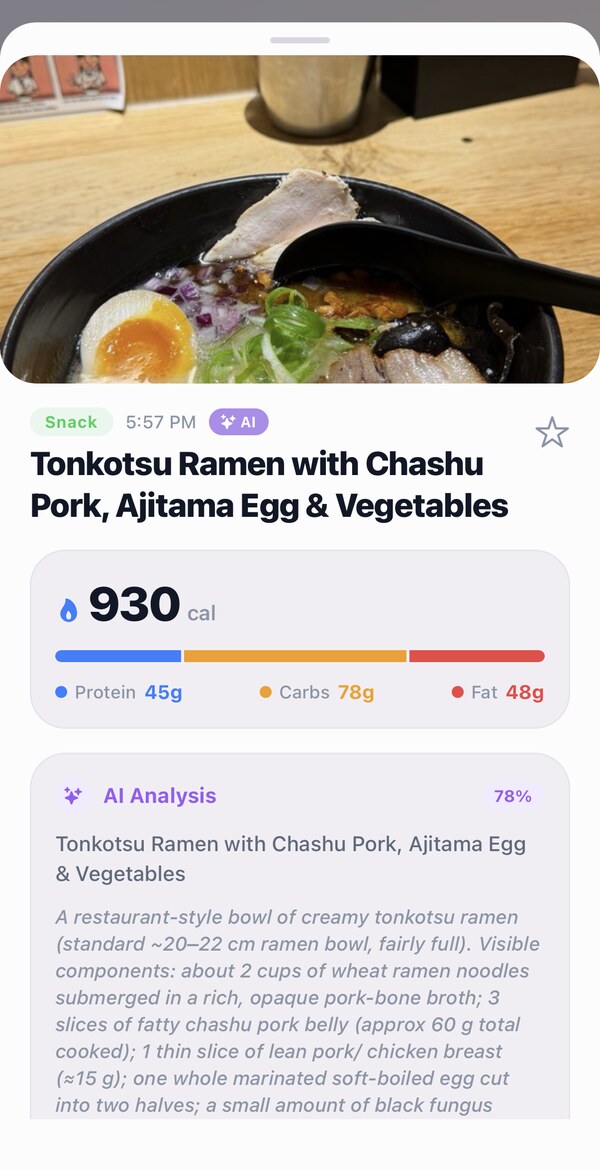
Snapping a photo of your lunch and getting a calorie and macro breakdown back in a few seconds is genuinely useful technology. It is also slightly misunderstood technology. If you know how AI photo calorie counting works, where it is reliable and where it is not, you will use it far better. If you do not, you will either over-trust individual meal numbers or dismiss the whole approach when a restaurant estimate comes back off.
What the AI photo calorie counter is actually doing
The process runs in sequence. First, a vision model identifies the foods in the photo. Not just "chicken," but something closer to "grilled chicken breast, approximately 130–150g based on plate diameter and food height, cooked dry." Then it maps each identified item to a nutrition database and estimates the macro and calorie content of each component. Then it sums them.
Good systems account for what's easy to forget: cooking oil absorbed by vegetables, dressing on a salad, butter on toast, sauces blended into a dish. These additions are invisible in a photo but real on the plate. A system that ignores them consistently undercounts, sometimes by a wide margin.
The model is doing a lot of inference from a flat two-dimensional image of a partly hidden three-dimensional object. Understanding that honestly is the key to using it well.
Accuracy ranges: what to expect by food type
These are approximate ranges based on the nature of the estimation problem, not claimed figures from any app:
- Simple whole-food plates (grilled protein, steamed vegetables, a bowl of rice): typically within 10–15% of actual calories. Food shapes are predictable, components are visible, portion geometry is readable.
- Home-cooked mixed dishes (stir-fry, pasta, grain bowls): expect 15–25% variance. The model handles identifiable components well but can't see inside a blended sauce or estimate how much oil was in the pan.
- Restaurant meals: 25–40% variance is common. Portion sizes vary enormously by restaurant, and preparation methods (butter-finishing, cream in soups, oil in sauces) are both invisible and calorie-dense. Treat restaurant estimates as useful reference points, not precise figures.
Hidden fats are consistently the biggest source of undercount. A tablespoon of olive oil is roughly 120 calories that won't appear in a photo. Salad dressing can add 150–300 calories to what looks like a modest plate.
What photo logging is actually good for
For a typical home-cooked plate (a protein, a starch, a vegetable) photo logging is quick and accurate enough. Three seconds to log a meal you'd otherwise either skip or spend two minutes entering manually. That's a real improvement.
It's also good for consistency. The biggest failure mode in nutrition tracking is quitting. When logging takes 30 seconds instead of 3 minutes, people do it more reliably. Consistent approximate data, tracked across weeks, is worth more than precise data collected three days a month and then abandoned.
When to use a different logging method
A few situations call for a different approach. Here's a quick comparison:
| Method | Speed | Accuracy | Best for |
|---|---|---|---|
| Photo scan | ~5 sec | 10–25% variance depending on dish | Home meals, restaurant plates, whole foods |
| Barcode scan | ~3 sec | Exact label nutrition | Any packaged food |
| Recipe photo | 10 sec setup / 2 sec after | Good once saved | Dishes you cook regularly |
| Quick text | ~5 sec | Good for well-known foods | Familiar snacks, simple staple meals |
For packaged foods with a barcode, scan rather than photograph. It's exact label nutrition with no estimation at all. For a recipe you cook regularly, use WorkoutPal's recipe-photo mode once: photograph the full dish, describe the recipe briefly, and save it. Every subsequent log of the same meal takes about two seconds.
Five habits that improve photo log accuracy
- Shoot from directly above, not at an angle. Overhead shots give the clearest view of portion geometry and plate diameter for scale.
- Keep a reference object in frame, such as a standard dinner plate or a fork. Scale references improve portion estimation significantly.
- Add a short text note for any significant hidden ingredient: "cooked in a tablespoon of olive oil" or "with ranch dressing on the side." WorkoutPal accepts natural-language adjustments and updates the estimate.
- For meals with both packaged components (jarred sauce, canned beans, Greek yogurt) and fresh ones, barcode scan the packaged part and photo-log the rest.
- Trust your weekly macro trend more than any single meal number. Consistency beats precision. One slightly-off estimate in a week of logged meals doesn't move the needle.
Beyond calories: the health score
A calorie number alone doesn't tell you much about what you're eating. A plate of salmon with roasted vegetables and a bag of chips can sit at the same calorie total while being nutritionally very different.
WorkoutPal adds a transparent health score to every logged meal: a 0–100 score with a letter grade based on protein density, fiber content, added sugar, sodium, saturated fat, processing level (NOVA group), and additive count. The breakdown is visible. You can see exactly which factors drove the score up or down, not just the number.
Whole single-ingredient foods score well. Heavily processed foods with long additive lists and high added sugar score lower. Most meals land in the middle, and the breakdown tells you what's driving the result. The score is not a moral judgment; it is a useful quality signal alongside the quantity number.
For the protein side of logging, see how to hit your protein goal every day.
Frequently asked questions
How accurate is AI photo calorie counting?
For simple plates with identifiable whole foods, within roughly 10–15% of actual is typical. Mixed dishes and restaurant meals have wider variance: 15–25% and 25–40% respectively. The single biggest source of undercount is hidden cooking fats that don't appear in a photo. Use photo estimates as trend data rather than precise per-meal facts.
What foods are hardest for AI to estimate calories from a photo?
Mixed dishes where components are blended or layered (curries, stews, burritos), restaurant meals with variable portion sizes, and any food with significant hidden fats: cooking oils, dressings, butter-finished sauces. Barcode scanning the packaged components or adding a text note about hidden ingredients improves accuracy for these cases.
Is photo calorie counting accurate enough for tracking macros?
Yes for protein and carbohydrates broadly. Fat is harder because much of it hides in cooking methods. Supplement photo logs with barcode scans on packaged components and quick text notes for hidden ingredients when you need more precision on fat.
What's the fastest way to log calories accurately?
For packaged foods: barcode scan (exact, no estimation). For home-cooked whole foods: photo logging (about 5 seconds, good accuracy). For recipes you cook regularly: save once with recipe-photo analysis, log in 2 seconds after. For familiar snacks and staples: quick text entry.
How WorkoutPal makes logging fast and honest
The whole value of photo calorie counting is speed: a three-second log beats a two-minute manual entry you skip half the time. WorkoutPal is built around that. Point your camera at the plate and it estimates the calories and macros. Scan a barcode for a packaged product and it pulls the exact label. Photograph a recipe and it breaks down the ingredients. Or just type "two eggs and toast" if that is faster. You pick whichever method fits the meal, and the friction of tracking mostly disappears.
It also stays honest about the estimate. Every photo log is presented as an estimate you can adjust, not a hard number dressed up as fact, and each meal gets a transparent health score that looks past calories at fiber, added sugar, sodium, and how processed the food is. So you see quality, not just quantity, and you are never misled into trusting a precise-looking figure the camera could not actually know.
Logging is one piece of a free, complete plan
Counting calories only helps if it connects to a target that means something. In WorkoutPal, every meal you log feeds the same plan that holds your workouts, your protein and calorie goals, and your recovery, so the AI coach can act on what you ate, suggesting a higher-protein dinner or rebalancing the day when you go over.
You get all of it free. Answer a few questions about your goal, lifestyle, and preferences, and in about a minute WorkoutPal builds a complete, personalized workout and meal plan, with photo, barcode, recipe, and text logging included. It is completely free to use, with no paywall and nothing important locked behind a subscription.
Log any meal in seconds
Photo scan, barcode, recipe photo, or quick text, plus a transparent health score on every meal. Free on iPhone.
Download free on the App Store